

If your pet’s routine has changed, you’ve noticed outdated information, or you’d like to add new details, you can easily update your pet’s profile at any time.
Keeping your pet’s care instructions up to date helps us provide the most accurate, safe, and personalized care possible.
How Do I Update My Pet’s Profile?
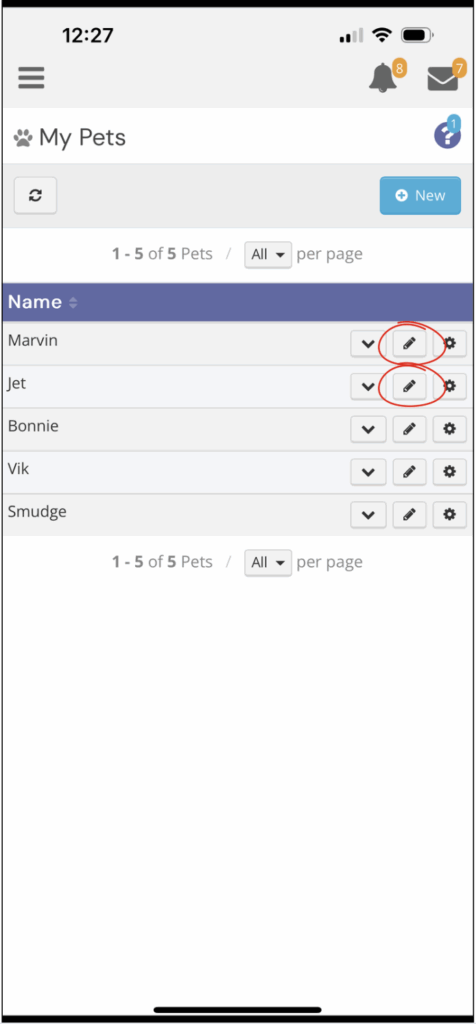
To edit your pet’s details:
- Log in to your client account
- Tap the ☰ menu (top left corner)
- Go to Pets
- Locate the pet you’d like to update
- Tap the pencil icon (✏️) next to their profile
- Make your updates
- Click Save at the bottom of the page
When Should I Make Updates?
We recommend updating your pet’s profile anytime there are changes to:
• Food or feeding schedule
• Medications or medical conditions
• Potty or litter routines
• Walking preferences or behavior
• New quirks, habits, or sensitivities
If something has changed—even slightly—it’s best to update it here.
Important Reminder
Updating your pet’s profile ensures our team has the most accurate information. For time-sensitive updates, please also:
• Add a note directly to your upcoming service
• Or reach out through the Messages feature
This helps ensure nothing is missed before your next visit.
Pro Tips
• Be specific when updating instructions
• Remove outdated details to avoid confusion
• Review your pet’s profile before travel or extended services
• Revisit seasonal notes as weather changes
Need Help?
If you’re unsure how to update your pet’s information or what to include, our team is always happy to help.
You can reach out through the Messages feature or browse the Client Support Center for more guides.