

If you no longer need a pet profile in your account, you can update their status to remove them from your active view.
This keeps your account clean and organized while still preserving your pet’s information for future reference.
How Do I Remove a Pet?
To remove a pet from your account:
- Log in to your client account using your credentials
- Tap the ☰ menu (top left corner)
- Go to Pets
- Find the pet you’d like to remove
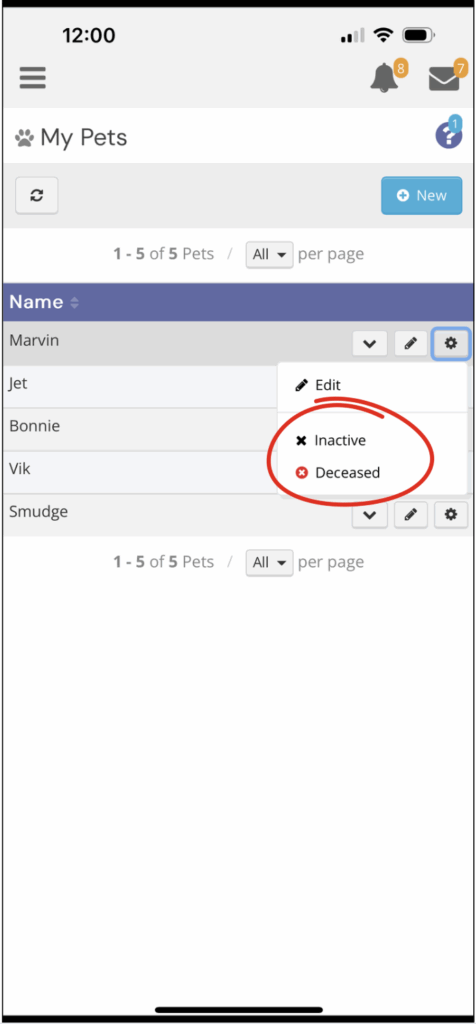
- Tap the three dots (…) on their profile
- In the Status dropdown, select either Inactive or Deceased
What Do These Statuses Mean?
Instead of permanently deleting a pet profile, we use status updates:
- Inactive — for pets you no longer need services for
- Deceased — for pets who have sadly passed away
Updating the status will hide the profile from your active view while keeping the information stored in your account on our end.
Why This Matters
Archiving past pet profiles allows our team to:
- Reference past care if needed
- Maintain accurate account history
- Easily reactivate a profile if circumstances change
Can I Reactivate a Removed Pet Later?
Yes. If you ever need to bring a pet back to active status in your account, simply reach out to our team and we’ll take care of it for you.
Need Help?
If you’re unsure which status to choose or need assistance updating your account, we’re always happy to help.
You can reach out through the Messages feature in the app or browse the Client Support Center for more guidance.